
VR Vision · Enterprise & Developer Guide
Virtual Reality Development: The Complete Enterprise and Developer Guide
From first principles to production deployment — hardware, engines, architecture, interaction, performance, and the enterprise framework that turns immersive technology into measurable results.
Virtual Reality has moved from novelty to infrastructure. The headsets are good enough, the engines are mature, and the deployment tooling finally works at fleet scale. For developers, the question is no longer “can we build this?” but “how do we build it well, ship it to thousands of devices, and prove it worked?” For enterprise leaders, the question is “where does immersive training or simulation actually beat the alternatives, and how do we measure the return?”
This guide answers both — walking from what VR is and how tracking works, through hardware selection, engine choice, architecture, interaction design, and performance optimization, to a complete enterprise deployment framework. The lens throughout is practical: real hardware, real constraints, and real-world examples from energy, manufacturing, healthcare, defense, and transit, where the cost of getting training wrong is measured in lives, not lost levels.
Who this is for: software developers new to VR, Unity and Unreal Engine developers expanding into immersive work, enterprise technology leaders, product managers, XR consultants, innovation teams evaluating the technology, and technical decision-makers who need to separate signal from hype.
Introduction
What is Virtual Reality?
Virtual Reality is a computer-generated, three-dimensional environment that a person can perceive and interact with as though it were real. The defining feature is sensory replacement: a VR headset takes over your field of view and, increasingly, your hearing, replacing the physical world with a synthetic one that responds to how you move your head, hands, and body. When the system does this convincingly — low latency, high frame rate, accurate tracking — the brain accepts the illusion and behaves as if the virtual space were genuine. That acceptance is the entire point. It is why a trainee who has only ever practiced a high-voltage isolation procedure in VR will hesitate at the right moment when they finally do it for real.
VR sits within a broader family of immersive technologies often grouped under the umbrella term XR (extended reality), which also includes Augmented Reality (AR) and Mixed Reality (MR). For now, the working definition is simple: if a display replaces your view of the world and tracks your movement so the virtual scene stays locked in place, you are doing VR.
The evolution of VR technology
VR is older than most people assume. The conceptual lineage runs from Morton Heilig’s Sensorama in the early 1960s, through Ivan Sutherland’s head-mounted display later that decade, to the much-hyped and largely disappointing consumer VR of the 1990s. The hardware of that era could not deliver the frame rates, resolution, or tracking precision the experience demanded, and the field went quiet for two decades.
The modern era began around 2012–2016, when smartphone-driven advances in small high-resolution displays, inexpensive inertial sensors, and mobile GPUs collided with renewed investment. The decisive shift came with standalone headsets — self-contained devices with onboard processing and inside-out tracking that need no external sensors or tethered PC. Standalone hardware collapsed the cost and setup friction that had kept VR in labs and arcades, and it is the reason enterprise VR training is now deployable to thousands of frontline workers rather than dozens.
Why VR matters today
Three things changed at once. First, the hardware crossed the “good enough” threshold: current standalone headsets render sharp, comfortable, full-color experiences with reliable tracking at a price point that fits a corporate training budget. Second, the engines and SDKs matured, so a competent game developer can become a competent VR developer in weeks rather than years. Third, fleet-management tooling emerged, making it practical to enroll, update, monitor, and lock down hundreds or thousands of devices the way IT already manages laptops and phones.
The result is that VR’s most durable value has turned out to be less about entertainment and more about training, simulation, and spatial work. A widely cited PwC study found that VR learners can reach competency dramatically faster than classroom or e-learning equivalents, with stronger confidence and engagement — advantages that compound in high-hazard environments where you cannot safely let a novice practice on live equipment. That is the business case in one sentence: VR lets people make mistakes in a place where mistakes are free.
Consumer vs Enterprise VR
These two worlds share hardware and engines but almost nothing else.
| Dimension | Consumer VR | Enterprise VR |
|---|---|---|
| Primary goal | Entertainment, engagement | Measurable outcomes (competency, safety, cost reduction) |
| Buyer | Individual | L&D, IT, operations, EHS leadership |
| Content lifespan | Weeks to months | Years; maintained and versioned |
| Deployment | One device, one user | Fleets of hundreds to thousands, via MDM |
| Security | Minimal | SSO, data residency, air-gapped/offline options, audit trails |
| Success metric | Reviews, playtime | Time-to-competency, error reduction, ROI |
| Integration | App store | LMS/LRS, identity provider, analytics pipeline |
Chapter 1: Understanding VR Fundamentals
Before writing a line of code, you need a precise mental model of what the hardware is doing and what experience you are trying to create. This chapter builds that model.
VR vs AR vs MR vs XR
These terms are used loosely in marketing and precisely by engineers. The difference is how much of the real world the user can still see and how the virtual content relates to it.
| Term | What you see | Real world visible? | Anchored to real space? | Example |
|---|---|---|---|---|
| VR | Fully synthetic environment | No | N/A (you are inside it) | Trainee inside a digital twin of a substation |
| AR | Real world + overlaid info | Yes | Loosely (often screen-locked) | Phone app showing arrows over a machine |
| MR | Real world + virtual objects that respect it | Yes | Yes (occlusion, physics, depth) | A virtual panel on your real desk your hand can occlude |
| XR | Umbrella term for all of the above | — | — | Used when the modality doesn’t matter |
The practical implication: VR gives you total control over the environment, ideal when the real environment is dangerous, expensive, or unavailable (you cannot take a live nuclear reactor offline for a drill). MR is the right choice when the value comes from blending instruction into the real workspace. Most modern headsets are MR-capable via passthrough, but the majority of enterprise training content is built as VR because it needs a controlled, repeatable world — often an engineering-accurate digital twin of the real environment.
Choose the modality from the problem, not the hardware. If your value proposition is “practice a hazardous procedure without the hazard,” that is VR. If it is “guide a technician’s hands on the actual machine,” that is AR/MR. Building VR content and calling it MR because the headset supports passthrough is a common and expensive mistake.
Degrees of freedom: 3DoF vs 6DoF
“Degrees of freedom” (DoF) describes how the system tracks your movement.
- 3DoF tracks rotation only — pitch, yaw, and roll. You can look around, but if you lean forward or step sideways, the world does not respond. Cheap, simple, and a discomfort trigger the moment a user instinctively tries to move.
- 6DoF tracks rotation and position along three axes. Lean in to inspect a gauge, crouch to look under a panel, sidestep around an object — the world responds correctly. 6DoF is mandatory for any credible training experience. Every headset recommended in this guide is 6DoF.
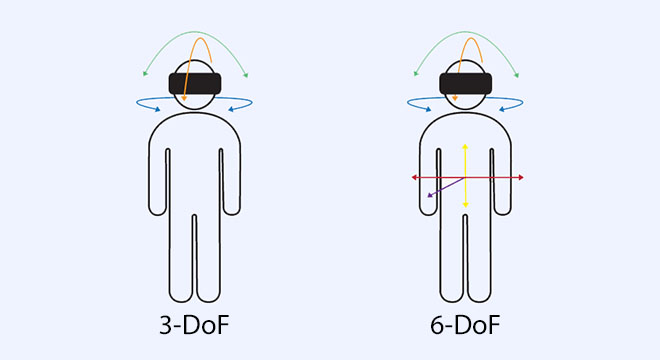
If a vendor pitches “VR training” that is actually 3DoF 360° video, treat it as interactive video, not VR. It has its place for orientation content, but it cannot support spatial skills, free movement, or genuine interaction.
Head tracking and motion tracking
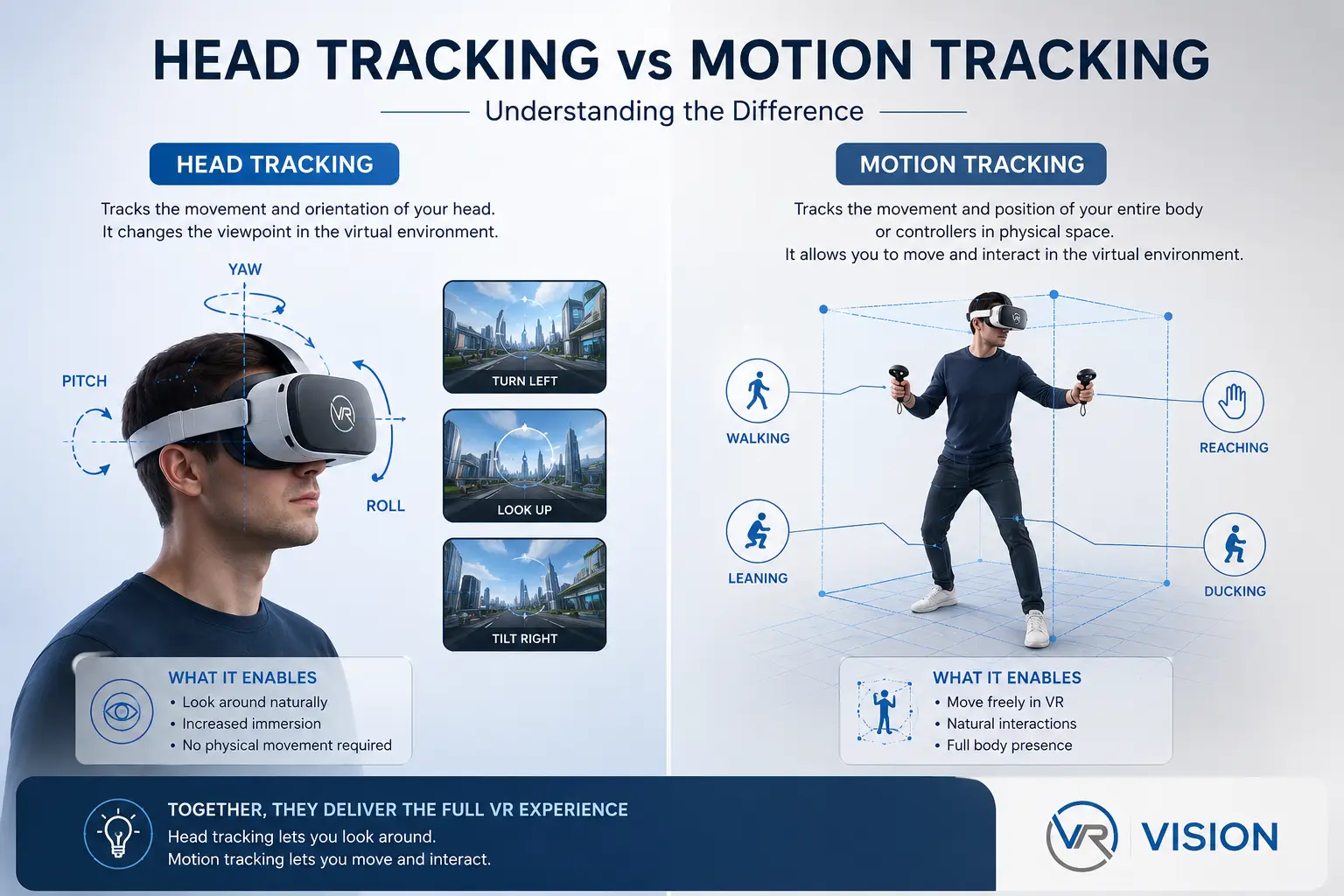
Tracking is the heart of VR. Two distinct problems must be solved continuously and fast: head tracking (where is the headset and which way is it pointed, determining the rendered viewpoint) and controller/hand/body tracking (where are the user’s hands and limbs).
Modern standalone headsets solve both with inside-out tracking: outward-facing cameras observe the environment, and computer-vision algorithms (SLAM — Simultaneous Localization and Mapping) compute the headset’s position relative to fixed features, while inertial sensors fill the gaps at high frequency. The older alternative, outside-in tracking, used external base stations — excellent precision, but it required permanent installation, which is why inside-out has won for nearly all enterprise deployments. The quality bar that matters: tracking must be low-latency (well under 20 milliseconds end to end) and robust (it must not lose track in dim light or near reflective surfaces). Tracking failures are a leading cause of motion sickness.
Spatial computing concepts
“Spatial computing” is the broader idea that the computer understands and operates within three-dimensional space. In VR this manifests as several layers: the play area / guardian / boundary (the safe physical region the user has defined, which your app must respect), the spatial anchor (a fixed point content can attach to so it stays put across sessions or users), and the scene mesh / spatial map (a reconstructed model of the real room, so virtual content can sit on real surfaces). Even pure-VR applications benefit from thinking spatially: where the user physically stands, how far they can reach, and where you place interactive elements so seated and standing users both succeed.
Immersion, presence, and embodiment
These three words are often used interchangeably and shouldn’t be.
- Immersion is a property of the system — how completely the technology surrounds the senses. Resolution, field of view, spatial audio, and low latency all increase it. Objective and measurable.
- Presence is a property of the user’s mind — the subjective feeling of “being there.” It is what makes a trainee flinch from a virtual arc flash. A single tracking glitch or frame-rate stutter can shatter it instantly.
- Embodiment is the sense that the virtual hands or avatar are your own body. Good hand tracking and responsive interactions build it; mismatches (your hand passing through a solid table) break it.
Presence and embodiment are not aesthetic luxuries — they are the mechanism by which VR training works. The brain encodes a presence-rich experience much like a real one. Protect presence above almost everything else: it is more important to hold a rock-solid frame rate than to add one more beautiful but expensive visual effect.
Chapter 2: VR Hardware Ecosystem
Hardware selection is the decision that constrains everything downstream — engine settings, art budget, deployment model, and per-seat cost. Specifications and pricing move quickly; verify current figures against manufacturer documentation before committing to a purchase.
The core trade-off
Every headset decision balances four competing factors: visual fidelity (resolution, lenses, field of view), compute (standalone chip vs PC-tethered), manageability and cost at fleet scale, and comfort and ergonomics. No single device wins on all four. Enterprise training overwhelmingly favors standalone, inside-out, 6DoF headsets because they optimize the factors that determine whether a deployment actually reaches the workforce.
Device-by-device overview
Meta Quest 3 & Quest 3S
Meta’s current standalone line is the default workhorse for enterprise VR training, and the two models are best understood together because they share the same Snapdragon-class XR processor — meaning application performance is essentially identical between them. The flagship Quest 3 uses pancake lenses for sharp, comfortable optics, a roughly 110° field of view, and approximately 2064×2208 resolution per eye with full-color passthrough — the safe choice when you want the best mainstream standalone experience. The budget Quest 3S reverts to Fresnel lenses, a narrower (~96°) field of view, and lower per-eye resolution (~1832×1920), but because it runs the same apps at the same speed, it is an excellent way to expand fleet size cheaply when raw visual fidelity is secondary to reach. You can mix both models in a single deployment — reserving the Quest 3 for content where optical clarity matters (fine gauge reading, detailed inspection) and using the 3S for everything else. Both offer mature ecosystems, broad developer support, and wide fleet-management compatibility.
PICO 4 Ultra Enterprise
ByteDance’s PICO line is the leading enterprise-focused alternative to Meta in many markets, and the 4 Ultra Enterprise variant is purpose-built for managed deployment: enterprise device management, business-grade support, and an IT-oriented configuration. The most common substitute for organizations that cannot use Meta hardware for procurement, regional, or policy reasons. Well-built OpenXR content runs across both with modest adaptation.
Apple Vision Pro
Apple’s premium spatial-computing headset, now shipping with the M5 chip and visionOS, pairs an extraordinarily high-resolution micro-OLED display system (23 million pixels across both eyes) with eye and hand tracking as the primary input. Its sweet spot is visual-fidelity-first use cases: CAD and design review, executive presentations, and high-detail visualization. It is the device you put in front of a design team or boardroom, not five hundred field technicians.
HTC Vive XR Elite
A compact, convertible headset for both enterprise and prosumer use, with full-color passthrough and a modular design. A credible option where HTC’s ecosystem, tracking accessories, or business relationships are already in place.
Varjo headsets (e.g., XR-4 series)
Varjo occupies the extreme high end: human-eye-resolution displays for simulation and engineering where absolute visual accuracy is non-negotiable — flight and driving simulators, automotive design finalization, aerospace inspection. Typically PC-tethered, expensive, and deployed in fixed simulation facilities.
Industrial and military-grade devices
Beyond the commercial market sit ruggedized and specialized headsets for defense and heavy industry: hardened enclosures, specialized optics, safety ratings, or integration with military training systems. Niche, procurement-heavy, and usually specified by the end customer.
Headset comparison
| Headset | Class | Compute | Lenses | Res/eye | FOV | Best enterprise fit |
|---|---|---|---|---|---|---|
| Meta Quest 3 | Standalone | Onboard | Pancake | ~2064×2208 | ~110° | Default training workhorse |
| Meta Quest 3S | Standalone | Onboard | Fresnel | ~1832×1920 | ~96° | Fleet expansion at low cost |
| PICO 4 Ultra Enterprise | Standalone | Onboard | Pancake | High | Wide | Managed / non-Meta orgs |
| Apple Vision Pro | Standalone | Onboard (M5) | Custom | Very high | ~100° | Design review, exec viz |
| HTC Vive XR Elite | Standalone/convertible | Onboard/PC | Pancake | High | ~110° | HTC-ecosystem deployments |
| Varjo XR-4 | PC-tethered | External PC | Bionic/aspheric | Human-eye class | Wide | Fixed simulators, engineering |

Key hardware subsystems explained
- Displays. Resolution per eye and pixel density (“pixels per degree”) determine sharpness. Micro-OLED delivers superb contrast at high cost; LCD is cheaper and brighter for the price. Care about angular resolution, not just raw pixels.
- Lenses. Pancake lenses are thinner, sharper edge-to-edge, and enable slimmer headsets; Fresnel lenses are cheaper but blurrier toward the periphery and prone to glare.
- Tracking. Inside-out (camera-based SLAM) dominates; it needs adequate lighting and textured surroundings. Outside-in (base stations) offers higher precision for fixed installations.
- Controllers. Still the most precise and reliable input for most training tasks, with buttons, triggers, and haptics.
- Hand tracking. Camera-based recognition of bare hands. Natural and low-friction, but less precise and more fatiguing for fine or sustained manipulation.
- Eye tracking. Enables foveated rendering (a major performance win), gaze-based UI, and rich analytics (did the trainee actually look at the warning label?).
- Passthrough. Cameras that show the real world, enabling MR and safe transitions. Color passthrough with depth is far more useful than grayscale.
Enterprise deployment considerations
- Mobile Device Management (MDM): enroll, configure, lock to kiosk mode, push apps, and wipe remotely. Platforms such as ArborXR and Meta’s device-management services are the backbone of any fleet over a dozen units.
- Provisioning and kiosk mode: frontline devices should boot straight into the training launcher, hiding the consumer storefront entirely.
- Hygiene and logistics: shared headsets need cleaning protocols, facial-interface swaps, charging carts, and a checkout process.
- Security: SSO, no personal accounts, controlled network access, and offline/air-gapped capability for sensitive sites (see our XR IT security & deployment best practices).
- Supply and lifecycle: favor enterprise SKUs with longer supported lifespans so a hardware refresh does not orphan your fleet.
Decide your management platform before your headset. The MDM and provisioning workflow determines whether a 500-seat rollout is a project or a nightmare, and it narrows the viable hardware list faster than any spec sheet.
Chapter 3: Choosing a VR Development Platform
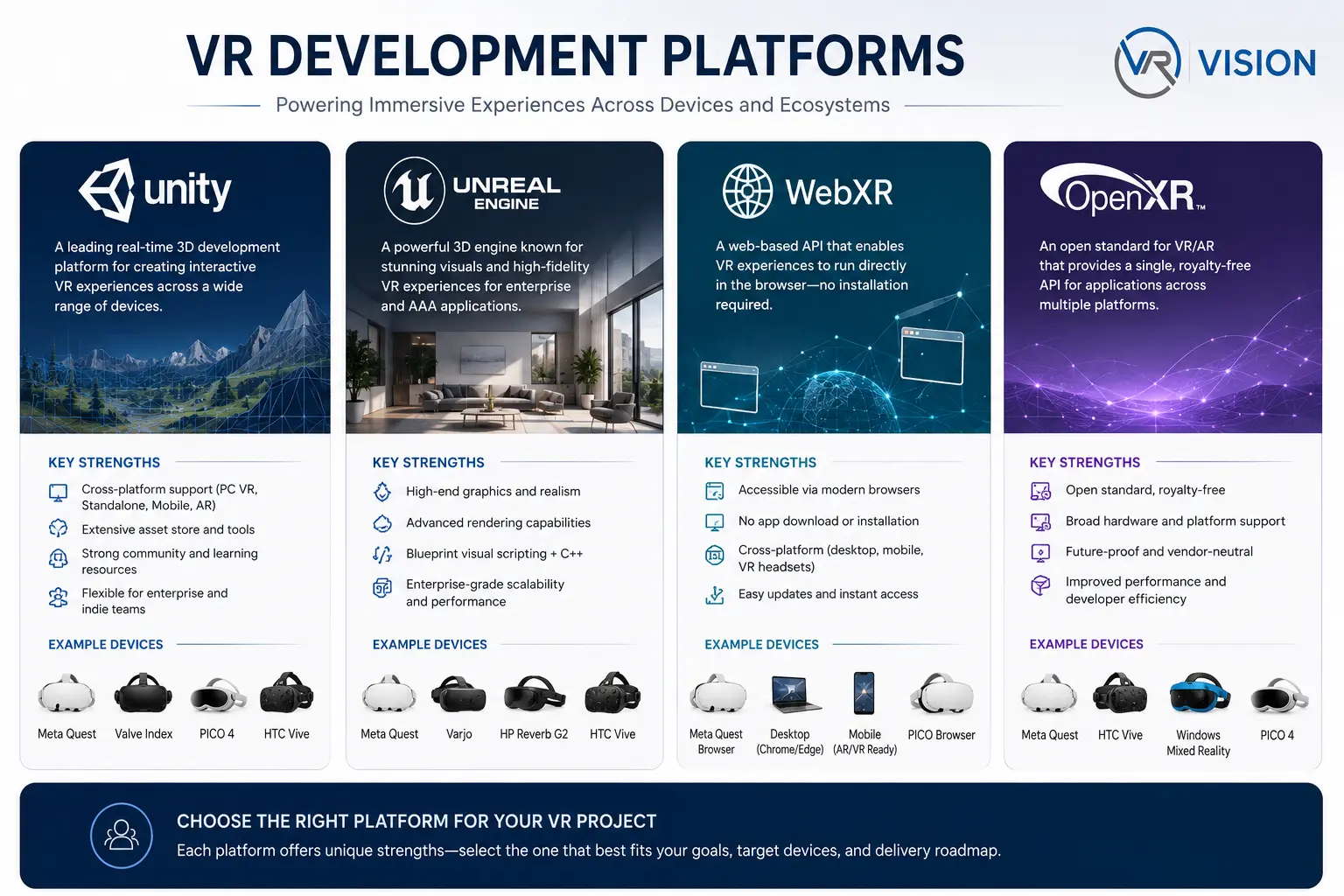
Your engine and API choices set the ceiling on what you can build and the floor on how much it costs to maintain. Four names dominate: Unity, Unreal Engine, WebXR, and the OpenXR standard that increasingly ties them together.
Unity
The most widely used engine for VR development, and the default for enterprise standalone VR. Strengths: a gentle learning curve relative to Unreal, an enormous asset ecosystem, first-class support for the Android-based chips inside Quest and PICO, and the XR Interaction Toolkit for ready-made locomotion, grabbing, and UI. C# is approachable, iteration is fast, and the overwhelming majority of deployed enterprise VR training runs on Unity.
Best for: standalone training simulations, digital twins for mobile headsets, multi-platform deployments. Limitation: out-of-the-box rendering is less photorealistic than Unreal. Enterprise adoption: very high.
Unreal Engine
The fidelity leader. Its rendering pipeline and tools (Nanite, Lumen) produce stunning visuals — the engine of choice when photorealism is the product: high-end simulation, architectural visualization, automotive, and PC-tethered experiences.
Best for: photoreal simulators, product/architectural visualization. Limitation: heavier and harder to optimize for low-power standalone chips; steeper learning curve. Enterprise adoption: strong in visualization; less common for large standalone fleets.
WebXR
Delivers VR/AR through the browser, with no app install. Its appeal is frictionless distribution — share a link and a headset’s browser runs it — and cross-platform reach.
Best for: marketing experiences, lightweight configurators, broad-access demos. Limitation: performance ceiling well below native; variable across browsers. Enterprise adoption: growing for lightweight reach; rarely the choice for heavy training.
OpenXR
OpenXR is not an engine — it is the open, royalty-free standard (from the Khronos Group) that defines how applications talk to VR/AR hardware. Before OpenXR, every headset had its own SDK and porting meant rewriting input and rendering glue for each device. OpenXR provides one API that Unity, Unreal, and custom engines target, and that Meta, PICO, HTC, Varjo, and others implement. Building on OpenXR is the single most important decision for portability: it is the difference between “our app runs on Quest and PICO with minor tweaks” and “we are locked to one vendor.” VR Vision builds on an OpenXR-based SDK framework for exactly this reason.
Build on OpenXR through Unity for the typical enterprise standalone training project — the broadest hardware portability, deepest tooling, and largest talent pool. Reach for Unreal when photorealism is the deliverable and the hardware can drive it. Use WebXR when no-install reach matters more than fidelity. Whatever the engine, target OpenXR so a hardware decision made today does not become a rewrite tomorrow.
Platform comparison
| Factor | Unity | Unreal | WebXR | OpenXR |
|---|---|---|---|---|
| Type | Engine | Engine | Browser API | Hardware standard |
| Fidelity ceiling | High | Highest | Moderate | N/A |
| Standalone performance | Excellent | Challenging | Limited | N/A |
| Distribution | App/MDM | App/MDM | URL, no install | N/A |
| Language | C# | C++/Blueprints | JS/TS | N/A |
| Learning curve | Moderate | Steep | Low (web devs) | N/A |
| Best for | Standalone fleets | Photoreal sim | Lightweight reach | Portability layer |
| Enterprise adoption | Very high | High (viz) | Growing | Becoming baseline |
Chapter 4: VR Development Architecture
A VR application is a real-time, latency-critical, stateful system that must hit a fixed frame budget every single frame, forever. That constraint shapes every architectural decision.
Application architecture
Favor a modular, decoupled architecture. The interaction layer (grab, point, move), the simulation layer (what the world does), the content layer (scenes, assets, scenarios), and the data layer (analytics, persistence, networking) should be separable so a change in one does not ripple unpredictably through the others. In enterprise training especially, scenarios change far more often than core systems; an architecture that lets a designer author a new scenario without touching engine code is worth far more than a clever monolith. A common, effective pattern: a thin application core that loads scenarios as data and systems as composable modules. The core handles session lifecycle (login, course selection, mode selection, results upload); systems handle reusable behaviors (locomotion, grabbing, tool use); scenarios are configuration plus scripted logic for a specific exercise.
Scene management
VR scenes are heavy, and you cannot afford a long black-screen hitch while a level loads — it breaks presence and can induce nausea. Use additive and asynchronous scene loading: keep a persistent “manager” scene alive for the whole session, and stream environment scenes in and out in the background. Show a comfortable, tracked loading space (a neutral room, never a frozen frame) during transitions. Unload aggressively; VR memory budgets are tight.
Asset pipelines
Standalone headsets are mobile devices. Your asset pipeline must produce content that respects mobile GPU and memory limits:
- Polygon budgets: model for the target, not the workstation. Aggressive use of LODs is mandatory.
- Texture compression: use the platform’s native compressed formats (e.g., ASTC); uncompressed textures exhaust memory fast.
- Draw-call discipline: batch and atlas. A scene that looks simple but issues thousands of draw calls will miss frame rate.
- Source-to-runtime conversion: for digital twins built from CAD/BIM/Revit and LiDAR data, you need a repeatable pipeline that decimates, retopologizes, and optimizes engineering-grade source models into VR-performant assets without losing the spatial accuracy the use case depends on. This step is often the most underestimated cost in an enterprise VR project.
Rendering systems
VR renders the scene twice — once per eye — so every rendering cost is effectively doubled. Choose a render pipeline tuned for VR (in Unity, URP is the usual standalone choice) and lean on VR-specific techniques: single-pass stereo rendering, forward rendering (generally friendlier to VR’s transparency and MSAA needs on mobile than deferred), and careful, minimal post-processing.
Physics systems
Physics in VR must feel right more than be perfectly accurate. Two recurring challenges: hand-driven interactions can impart wild velocities to grabbed objects (so clamp and smooth), and the player can put their head or hands through solid geometry (so decide deliberately how objects respond). For training, scope physics tightly — full soft-body or fluid simulation is rarely worth the cost, and it is reasonable to declare motor-skill physics (CPR force, hose dynamics, fluid/smoke) explicitly out of scope unless they are the core learning objective.
Event systems
A robust event/messaging system decouples “something happened” from “who cares.” When a trainee completes a step, opens a breaker, or makes a procedural error, an event fires; the analytics module, the UI, the scoring logic, and the instructor view all subscribe independently. This is what makes a scenario authorable and an analytics layer maintainable.
Data management
Enterprise VR generates valuable data: who trained, on what, how long, where they erred, what they scored. Design the data layer early with local-first capture (record events locally so a network blip never loses a session), sync and upload (push results to your platform/analytics backend — such as Vision Portal — and onward to an LMS/LRS when connectivity allows), and schema discipline (define your event taxonomy up front so dashboards and longitudinal analysis are possible).
Networking fundamentals
Even single-user training often needs networking for results upload, remote assistance, and content updates. The architectural principle: treat the network as unreliable and asynchronous, never assume it, and degrade gracefully to fully offline operation when the deployment site demands it (many industrial and high-security sites do).
At 72 Hz you have ~13.9 ms per frame; at 90 Hz, ~11.1 ms; at 120 Hz, ~8.3 ms. Everything — CPU logic, physics, rendering both eyes, post-processing — must fit, every frame. A feature that cannot fit the budget is not a feature; it is a bug waiting to make someone sick.
Chapter 5: Setting Up a VR Development Environment
A practical path from a clean machine to a build running on a headset. Exact menu names and version numbers change between releases; treat these as the canonical sequence and confirm specifics against current Unity, Unreal, and device documentation.
Prerequisites
- A reasonably powerful development PC (a capable GPU matters for in-editor VR preview).
- The target headset(s) and their USB cables.
- Developer mode enabled on the headset (via the manufacturer’s companion app/account).
- For Android-based standalone headsets (Quest, PICO): the Android build tooling (SDK/NDK), which the engine can install for you.
Installing Unity for VR
- Install Unity Hub, then install a current LTS version of the Editor through it.
- Add the Android Build Support module (OpenJDK, SDK, NDK) for standalone, and/or Windows Build Support for PC VR.
- Create a new project using the Universal Render Pipeline (URP) 3D template for standalone VR.
- In Package Manager, install XR Plugin Management, the relevant OpenXR plugin, and the XR Interaction Toolkit.
- In Project Settings → XR Plug-in Management, enable OpenXR for your target and add the appropriate controller interaction profiles.
- Configure player settings: correct texture compression (ASTC), graphics API (Vulkan), and the minimum API level the device requires.
Installing Unreal Engine for VR
- Install the Epic Games Launcher and a current Unreal Engine version.
- For Android/standalone, install the matching Android tooling Epic specifies (version matching is stricter than Unity — follow Epic’s docs exactly).
- Create a project from the VR template, which pre-configures stereo rendering and basic interaction.
- Enable the OpenXR plugin and disable legacy/vendor-specific VR plugins you are not using.
- Configure rendering for VR: forward shading, MSAA, instanced stereo, and a mobile-appropriate feature level for standalone.
OpenXR setup
OpenXR is configured within the engine rather than installed separately: enable the OpenXR runtime/plugin, select the interaction profiles for your controllers (mapping physical buttons to logical actions), and ensure the device’s OpenXR runtime is active. The payoff is that the same project targets multiple headsets by toggling profiles rather than rewriting input.
SDK installation
Beyond OpenXR you may add vendor SDKs for device-specific features not yet standardized — advanced hand-tracking, passthrough, or platform services. Add these as supplements to an OpenXR base, isolating vendor-specific code behind your own abstraction so it does not contaminate the portable core.
Device configuration
- Enable developer mode and connect the headset over USB.
- Approve the USB debugging prompt inside the headset.
- Confirm the device appears to the build tooling (e.g.,
adb devicesfor Android-based headsets). - Set the headset’s boundary/guardian for a safe play space during testing.
Testing workflows
Two complementary loops, used together: in-editor preview / link (run on the headset while it streams from the PC, for fast iteration without a full build) and device build (on-device) (periodically deploy an actual build, because in-editor preview hides real on-device performance). Standalone performance can only be judged from an on-device build.
Build deployment
- Build a package for the target platform (an APK for Android-based standalone headsets).
- Install to the device (via “build and run,”
adb install, or your MDM platform). - For fleets, push builds through your device-management platform (e.g., ArborXR, Meta’s management service) rather than cabling each unit.
- Tag and version every build. Milestone-based delivery (APK builds at Alpha, Beta, release) gives clients and QA a clear, testable cadence.
Stand up the full pipeline — editor to a build running on a real headset, deployed through your MDM — on day one with a trivial “hello world” scene. Discovering a provisioning, signing, or compression problem on a 5 KB test scene is cheap; discovering it the week before launch is not.
Chapter 6: Core VR Interaction Design
Interaction is where VR projects succeed or fail with users. The hardware can be flawless, but if grabbing feels wrong or movement makes people queasy, adoption dies. (For a deeper treatment, see our dedicated guide to interaction design for virtual reality.)
Locomotion: teleportation vs smooth movement
Moving through a space larger than the physical room is VR’s oldest UX problem, because the eyes report motion the inner ear does not feel — the root cause of VR sickness.
- Teleportation: point to a destination and instantly arrive. Nearly eliminates motion sickness because there is no continuous visual motion. The safest default and the right starting choice for broad enterprise audiences with mixed VR tolerance.
- Smooth (continuous) locomotion: glide through the world with a thumbstick. More immersive for experienced users, but a reliable nausea trigger for many. If you offer it, pair it with comfort aids and always let users opt into teleport instead.
Offer both, default to teleport, and remember your physical play space: a sit/stand mode with teleport plus short physical steps suits the cramped training rooms where headsets actually get used.
Grab interactions and object manipulation
Picking things up is the most fundamental VR verb. Decide deliberately: grab style (snap to a predefined pose for tools that must be held a specific way, or stay where the hand met it for naturalness), distance grab (pull distant objects to you to reduce walking and reaching), two-handed manipulation (for large or precise objects like a valve wheel), and release velocity (throwing must feel right; clamp absurd velocities from tracking noise while preserving intentional throws).
Hand tracking
Controller-free hand tracking lowers friction and raises embodiment, and shines for natural gestures, pointing, and simple presses. Its weaknesses are precision and fatigue: fine manipulation and long sessions are tiring (“gorilla arm”), and tracking drops when hands leave the camera view. Use hand tracking where the interaction is natural and brief; use controllers where precision, haptics, or sustained input matter. Many enterprise apps support both and let context decide.
Eye tracking
On supported headsets, gaze enables foveated rendering (a large performance win), gaze-based selection, and uniquely valuable training analytics: you can verify whether a trainee actually directed attention to a hazard or label — impossible to know in a classroom.
Gesture and voice
Defined hand gestures (thumbs-up, open-palm “stop,” a pinch) can drive menus without controllers — keep the vocabulary tiny and unambiguous, or similar gestures cause false triggers. Voice is powerful for hands-busy tasks (“next step,” “repeat instruction”) and conversational AI agents, but treat it as an additional channel, not a sole one — noisy industrial environments and privacy constraints mean voice cannot be the only way to do anything critical.
UI/UX principles in VR
- World-space, not screen-space. Menus pinned to the user’s face cause discomfort and look amateurish. Place UI in the world, at a comfortable distance (roughly 1–3 meters) and below the horizon.
- Comfortable reach and arc. Keep interactive elements within an easy reach envelope and a natural neck-rotation arc.
- Readable text. VR resolution is finite; use large type, high contrast, and short lines. Test legibility on device.
- Diegetic where possible. UI built into the world (a virtual tablet, control panel, clipboard) feels more present than floating panels.
- Generous targets. Fine pointing is hard in VR; make buttons big and forgiving.
Common interaction mistakes and solutions
| Mistake | Symptom | Solution |
|---|---|---|
| Smooth locomotion as the only option | Users feel sick, abandon the experience | Default to teleport; make smooth opt-in with comfort aids |
| Screen-locked menus | Discomfort, nausea, “cheap” feel | Use world-space UI at a comfortable distance |
| Tiny UI targets and text | Mis-taps, eye strain, frustration | Large targets, large high-contrast type, on-device testing |
| Objects passing through hands/world | Broken embodiment, confusion | Deliberate collision/grab response; haptic + visual feedback |
| Unclamped throw velocity | Objects fly off absurdly | Clamp and smooth release velocity |
| No feedback on interaction | Users unsure if an action registered | Haptics + audio + visual confirmation on every interaction |
| Requiring fine hand-tracking precision | Fatigue, errors | Use controllers for precise tasks; hands for natural gestures |
Every interaction needs multimodal feedback: a subtle haptic pulse, a sound, and a visual change, fired the instant an action registers. This single habit does more for perceived quality than almost any visual upgrade — it tells the user’s body that the world responded.
Chapter 7: VR User Experience Best Practices
Interaction is what the user does; UX is whether the whole experience is comfortable, accessible, and effective. In VR, comfort is not a nicety — discomfort ends sessions and kills programs.
Motion sickness prevention
VR sickness comes mainly from a mismatch between visually perceived motion and the vestibular sense of motion. The toolkit:
- Hold frame rate. Dropped frames and judder are primary nausea triggers. A locked, high frame rate is the single most important comfort factor.
- Minimize unrequested camera motion. Never move the camera without user intent; never take control of the view for cutscenes.
- Prefer teleport; gate smooth locomotion.
- Vignetting (tunneling). During smooth movement, narrow the peripheral field of view with a soft vignette; reducing peripheral optical flow markedly cuts sickness.
- Stable horizon and reference points. A fixed virtual nose, cockpit, or grounded reference reduces disorientation.
- No acceleration tricks. Constant velocity is more comfortable than accelerating/decelerating motion.
Comfort design
Design for seated and standing (many enterprise settings are seated), keep sessions to a sensible length (frequently 20–40 minutes) with natural breaks, and mind physical safety (respect the guardian boundary, warn on approach, avoid mechanics that make users step backward blindly).
Accessibility
- Height and reach options for wheelchair users and varied statures (adjustable virtual height, distance-grab).
- Handedness settings and one-handed alternatives for every two-handed action.
- Visual accommodations: scalable text, high-contrast modes, colorblind-safe palettes (do not encode meaning in color alone).
- Subtitles and captions for all spoken content.
- Comfort presets (teleport-only, strong vignette) for sensitive users.
User onboarding
Most enterprise trainees have never worn a headset. Onboarding must teach the basics before the content begins: a short, gentle VR tutorial (how to look, move, grab, and use the menu in a safe neutral space), progressive disclosure (one mechanic at a time), clear exit and help (users must always know how to pause or stop), and an instructor/observer path so a trainer can guide first-timers — a major reason multi-user instructor-led modes matter.
Spatial audio and human factors
Audio is half of presence and routinely underinvested. Spatialized 3D audio — sounds that come from their correct location and attenuate with distance — directs attention (“the alarm is behind you”), reinforces realism, and aids navigation. On human factors: account for headset weight and balance over a session, manage cognitive load (guide attention with light, motion, and audio rather than clutter), and match interaction pacing to real-world expectations so skills transfer.
Before scaling any program, run a small pilot specifically watching for discomfort and confusion. If even a minority of users feel unwell, fix it before rollout. A program that makes people sick will be quietly abandoned no matter how good the content is.
Chapter 8: Graphics and Performance Optimization
Performance is the discipline that separates demos from deployable products. In VR it is also a safety and comfort requirement, not just polish.
Frame rate and latency
VR targets a locked refresh rate — commonly 72, 90, or 120 Hz. “Locked” is the operative word: a steady 72 Hz is far more comfortable than a fluctuating 72–90. Design to the lowest target the device will run and hold it without exception. Motion-to-photon latency — the delay from movement to display update — must be imperceptibly low (well under 20 ms end to end). Techniques like late-stage reprojection / time-warp help by warping the last rendered frame to the latest head pose, but they are a safety net, not a substitute for hitting frame rate.
GPU optimization
The GPU usually limits VR because the scene renders twice. Use single-pass / instanced stereo rendering, reduce overdraw (minimize transparent layers), simplify shaders, bake lighting into lightmaps instead of expensive real-time lights, and limit real-time shadows.
CPU optimization
Cut draw calls (batch static geometry, atlas textures, combine meshes — a frequent standalone bottleneck), avoid per-frame allocation (GC spikes cause frame drops; pool objects), and profile relentlessly on device to find the real bottleneck rather than guessing.
Culling, LOD, and advanced techniques
- Occlusion culling: do not render what is hidden behind other geometry; combined with frustum culling, it dramatically cuts load in complex environments.
- Level of Detail (LOD): swap high-poly models for simpler versions as objects recede. Non-negotiable for standalone VR.
- Foveated rendering: on eye-tracked headsets, render full detail only where the user looks (dynamic) — a large GPU win with no perceptible quality loss. Fixed foveated rendering is a cheaper approximation without eye tracking.
- Dynamic resolution: scale render resolution down momentarily under GPU pressure and back up when it eases, protecting frame rate.
- Memory management: compress textures (ASTC), stream assets, unload unused scenes promptly, and budget memory as carefully as frame time.
Optimization checklist
- Frame rate locked at the device target, verified on device
- Single-pass/instanced stereo rendering enabled
- Static lighting baked; real-time lights and shadows minimized
- Draw calls batched/atlased; counts within budget
- LODs on all significant meshes
- Occlusion + frustum culling configured
- Textures compressed (ASTC) and sized appropriately
- Foveated rendering enabled where hardware supports it
- Dynamic resolution available as a safety valve
- No per-frame heap allocations; object pooling in place
- Memory budget defined and monitored; no leaks
- Profiled on the lowest-spec target device in the fleet
Optimize against your worst device, not your best. If the fleet mixes Quest 3S and Quest 3 units, the 3S sets the budget — and because both share a processor, the difference is mostly optical, so your performance target is genuinely shared. Profile on the real hardware your users will hold, in the lighting of the real room.
Chapter 9: Enterprise VR Applications
This is where the technology earns its keep. The common thread across every successful enterprise application is the same: VR is most valuable when the real-world alternative is dangerous, expensive, rare, or impossible to access.
Representative outcomes from VR Vision enterprise energy-sector deployments.
Employee training (the anchor use case)
Training is the dominant enterprise application because the value is so clean: practice without consequence, at scale, with measurement (our ultimate guide to VR training goes deeper on the why and how). VR lets a new technician repeat a hazardous procedure a hundred times before touching live equipment, standardizes instruction so quality does not depend on which trainer is available, and captures data on what each learner did. The recurring outcomes across deployments are faster time-to-competency, fewer training incidents, and strong knowledge retention.
Manufacturing
Assembly procedures, equipment operation, quality inspection, and safety protocols translate directly to VR. Manufacturers use immersive process training to onboard at scale across global plants, standardize complex assemblies, and rehearse changeovers without stopping a line. A global automotive manufacturer deploying immersive process training at manufacturing scale demonstrates the model: many users, high throughput, and a platform stable enough to manage centrally.
Healthcare
Healthcare uses VR for clinical skills, procedural rehearsal, equipment familiarization, and increasingly patient-facing therapy (exposure therapy, pain distraction, rehabilitation). The appeal mirrors industry: practice high-stakes procedures repeatedly without risk to patients. Medical device manufacturers also use VR to train clinicians on new equipment before it ships.
Defense
Military and defense were early VR adopters because the alternative — live training — is the most expensive and dangerous of all. Applications span vehicle and equipment operation, mission rehearsal, maintenance of complex systems, combat-casualty care, and familiarization with environments soldiers cannot otherwise safely access. Defense deployments typically demand the strictest security: offline/air-gapped operation, hardened devices, and tight data control.
Aerospace
Aerospace uses VR for aircraft maintenance training, assembly procedures, cabin- and ground-crew operations, and complex-systems familiarization. The precision of digital twins matters acutely: a maintenance procedure trained against an inaccurate model is worse than no training.
Energy and utilities
Energy is one of the richest VR training domains because the environments are genuinely deadly — high-voltage substations, transmission lines, wind turbines, gas infrastructure, and increasingly nuclear facilities. Utilities use high-fidelity digital twins of their own substations and equipment to train hazard recognition, isolation procedures, and emergency response where a real mistake can be fatal and taking infrastructure offline for a drill is impractical. Reported outcomes include substantially faster onboarding and large annual savings from reduced travel, downtime, and incident rates. The pattern that works: ingest the utility’s existing engineering data into a 1:1 virtual replica, replicate exact procedures, and validate with subject-matter experts so the training is compliance-grade rather than approximate — the approach behind our enterprise VR safety training and CGI simulation work.
Retail, education, and AEC
Retail uses VR for customer-service scenarios, store operations, loss prevention, and merchandising visualization. Education uses it for experiential learning, virtual labs, and vocational/pre-apprenticeship skills programs that teach manufacturing, electrical, and trade skills before learners reach real equipment. Architecture, engineering, and construction (AEC) use it for design review at true scale (walk through a building before it is built), clash detection, client presentations, and construction-sequence and safety planning — catching problems that 2D plans and desktop 3D miss.
Cross-sector implementation pattern
| Stage | What happens |
|---|---|
| Source data ingestion | CAD/BIM/Revit + LiDAR converted into VR-optimized, spatially accurate models |
| Procedure replication | Real procedures rebuilt 1:1 in VR, validated by subject-matter experts |
| Platform & systems | Login/SSO, course selection, single- and multi-user modes, scenarios, knowledge checks |
| Deployment | Pushed to a managed fleet via MDM; SSO and (where needed) offline operation |
| Analytics & ROI | Usage, completion, errors, and survey data captured and synced to dashboards/LMS |
In tight professional networks like nuclear, utilities, and defense, exaggerated claims are quickly checked and fatal to trust. Cite only what you can prove, validate procedures with the customer’s own experts, and let measured outcomes (onboarding time, incident reduction) carry the argument.
Chapter 10: Multiplayer and Collaborative VR
Single-user VR teaches an individual. Multi-user VR enables instructor-led training, team drills, and remote collaboration — and it is dramatically harder to build well.
Networking architectures
Two broad models: client-server (authoritative server), where a server holds canonical state and clients sync to it — more robust against inconsistency, the standard for serious applications, and what you want when training records must be trustworthy; and peer-to-peer / relay, simpler for small sessions but harder to keep consistent and secure at scale. Most enterprise collaborative VR uses an authoritative-server model, often with a dedicated relay/hosting layer (self-built or via a networking framework), and frequently offers a choice of cloud-hosted or on-premises hosting to satisfy data-residency rules.
Shared environments and avatars
All participants must perceive a consistent world: when one trainee opens a breaker, everyone sees it open immediately. This requires synchronizing object state, ownership (who controls a given object right now), and interactions while masking latency so the experience still feels instant locally. Avatars need enough fidelity to convey presence and gesture — head and hand position at minimum, ideally pointing, gaze, and gross posture — without flooding the network. Even simple avatars, if head and hands move responsively, create a strong sense of “we are here together.”
Voice, synchronization, and security
Spatialized voice — hearing a colleague from their avatar’s location — is essential for natural collaboration and instruction. For data synchronization, sync state changes not continuous full state, use client-side prediction with server reconciliation to hide latency, designate clear ownership for each interactive object, and ensure the authoritative record of what happened is captured server-side so results cannot be faked or lost. Security widens with multi-user: authenticate every participant (SSO), encrypt traffic, control who can join which session, and respect data residency. In regulated sectors, fully on-premises or air-gapped operation is frequently a hard requirement.
Build single-user first, with a clean event system and clear object ownership, then layer networking on. Retrofitting multiplayer onto an architecture that assumed one local user is one of the most expensive mistakes in VR development. If multi-user is a known requirement, design ownership and state-sync into the architecture from day one even while shipping single-user first.
Chapter 11: AI and the Future of VR Development
AI and VR are converging fast, and the combination is more than the sum of its parts: VR supplies an embodied, spatial context that makes AI agents feel present, while AI supplies the adaptivity and content generation that make VR worlds richer and cheaper to build.
AI-powered NPCs and conversational agents
Large language models let virtual characters hold natural, unscripted conversations. In training, this is transformative: a trainee can practice a difficult customer interaction, a safety briefing, a medical patient history, or an emergency-coordination dialogue with an AI character that responds dynamically rather than picking from a branching script. Combined with voice input and spatialized speech output, these agents become believable role-play partners available on demand, at scale, without a human actor.
Generative environments and digital twins
AI-assisted content generation is beginning to compress the most expensive part of VR development — building the 3D world. Generative tools can help produce textures, props, layout variations, and scenario permutations, lowering the cost of variety (different store layouts, fault conditions, patients) that used to require hand-building each case. A digital twin — a precise virtual replica of a real asset or facility — is the backbone of high-fidelity enterprise VR training. The frontier is living digital twins fed by real sensor data, so the virtual model reflects the current state of the physical asset; pairing a living twin with VR lets operators train against and rehearse interventions on a faithful mirror of the real system.
Adaptive training and future trends
AI turns training from fixed to adaptive. By analyzing how a learner performs — where they hesitate, what they get wrong, what they skip — the system can adjust difficulty, surface targeted remediation, and personalize the path, fed by rich VR analytics including gaze data on eye-tracked devices. Looking ahead: lighter and better hardware, tighter on-device and cloud AI integration, continued standardization via OpenXR, and convergence toward general spatial computing as the VR/AR/MR boundary blurs.
Treat AI as a capability you architect for, not a feature you bolt on. Design clean interfaces between your simulation and external AI services, keep latency budgets in mind (a conversational agent that takes three seconds to respond breaks the interaction), and be deliberate about where AI inference runs given your security and connectivity constraints.
Chapter 12: VR Development Workflow for Enterprises
A great VR application built the wrong way still fails as a program. This is the end-to-end framework for delivering enterprise VR that gets adopted and proves its value — an Agile, milestone-based model with defined scope, revision allowances, and regular client checkpoints. For a step-by-step rollout companion, see our VR training implementation playbook.
- Discovery. Define the real problem before discussing technology. What outcome must improve — onboarding time, incident rate, throughput, compliance? Who are the learners, in what environment, on what hardware? What does success look like numerically? Capture scope, stakeholders, and requirements in a single living design document.
- Requirements gathering. Translate the outcome into specifics: which procedures, environments, fidelity level, devices, integrations (SSO, LMS/LRS), security constraints (offline? air-gapped? data residency?), and analytics. Pin down what is explicitly out of scope as firmly as what is in.
- Prototype development. Build a small, focused prototype that proves the riskiest assumptions: the core interaction, the hardest environment-conversion step, the performance on the real device. A prototype retires risk and aligns stakeholders, not pretties.
- Pilot testing. Deploy a limited version to a representative group on actual hardware in the actual setting. Watch for comfort, usability, and training transfer; collect quantitative and qualitative data; iterate before scaling.
- Deployment. Roll out through your device-management platform: provision headsets, lock to kiosk mode, configure SSO, push the build, and establish logistics (charging, cleaning, checkout, support). Plan for offline operation where required.
- Scaling. Expand across sites, languages, and scenarios. An OpenXR-based, modular, scenario-driven architecture scales cheaply; a monolith does not.
- Maintenance. Plan for ongoing OS/headset updates, bug fixes, periodic content revisions, hosting for multiplayer and analytics, and technical support — often structured as an annual M&S agreement scaled to the deployed scope.
- Analytics and ROI measurement. Capture usage, completion, error, and survey data; sync to dashboards and the LMS/LRS; compare against the discovery baseline. Did onboarding time fall? Did incidents drop? This is what justifies expansion and renewal. To model the numbers up front, use our VR training ROI calculator and the guide to VR training costs.
| Phase | Goal | Key output | Risk if skipped |
|---|---|---|---|
| 1. Discovery | Define the real problem | Outcome + success metrics | Building the wrong thing |
| 2. Requirements | Specify in/out of scope | Design document | Scope creep, overrun |
| 3. Prototype | Retire technical risk | Working core on device | Late, expensive surprises |
| 4. Pilot | Validate with real users | Data + feedback | Scaling a flawed experience |
| 5. Deployment | Reach the full audience | Managed fleet live | Logistics/security failures |
| 6. Scaling | Expand reach & content | More sites/scenarios/languages | Architecture that won’t scale |
| 7. Maintenance | Keep it healthy | M&S agreement, updates | Decay and abandonment |
| 8. Analytics/ROI | Prove the value | ROI report vs baseline | Can’t justify renewal |
Use a single consolidated feedback channel from the client, cap iteration cycles per phase, review progress on a regular cadence (a shared board and weekly check-ins), and route anything outside agreed scope through a formal change order. Disciplined governance is the difference between a profitable, on-time delivery and an open-ended money pit.
Chapter 13: Common Challenges and How to Solve Them
Every VR program hits the same recurring obstacles. Knowing them in advance is most of the battle.
| Challenge | Root cause | Core solution |
|---|---|---|
| Technical limitations | Constrained standalone hardware | Design and profile to the device; protect the frame budget |
| User adoption | Unfamiliarity, discomfort, skepticism | Onboarding, comfort defaults, instructor mode, early wins |
| Hardware logistics | Managing physical fleets | MDM + kiosk + operational logistics planned early |
| Security | Regulated data/identity needs | SSO, encryption, offline/on-prem, early IT engagement |
| Content cost | Expensive 3D/digital twins | Repeatable pipeline, modularity, data-driven scenarios, AI assist |
| Organizational resistance | Inertia, unclear ownership | Pilot tied to a metric, exec sponsor, prove ROI, then scale |
On technical limits, design to the device from the start and profile continuously on the lowest-spec fleet device. On adoption, a smooth first five minutes determines whether a user ever comes back. On logistics, the software is often the easy part; the carts, hygiene, checkout, and support overwhelm unprepared teams. On security, engage the customer’s IT/security team early — review is a gate, and discovering its requirements late can derail a launch. On content cost, scope fidelity to the learning objective — not every surface needs to be photoreal (our guide to VR training costs breaks down what drives price). On resistance, land one undeniable win before asking for a big commitment.
Chapter 14: Future Outlook
The framing is shifting from “virtual reality” to spatial computing — computers that understand and operate in 3D space as a general capability. As headsets gain better scene understanding, persistent anchors, and seamless real/virtual blending, the technology becomes a general-purpose interface for spatial work, not just a training simulator.
The hard lines between VR, AR, and MR are dissolving into a continuum of immersion controlled in software. Headsets are getting lighter, pointing toward eyewear-form-factor wearable computing comfortable enough for extended wear. And VR is shifting from pilot curiosity to training infrastructure: the organizations getting the most value treat it as a permanent capability — owned digital twins, libraries of maintained scenarios, integrated analytics, managed fleets — rather than a one-off project. Emerging technologies to watch: near-human-eye displays at consumer cost, advanced haptics (gloves, suits, ultrasonic), biosignal interfaces, 5G/edge rendering, and pervasive AI becoming default rather than differentiator.
The fundamentals are settled: standalone 6DoF hardware, OpenXR portability, mature engines, and real fleet tooling. The next decade is about better, lighter, smarter, and more integrated — not about whether the technology works. For enterprises, the strategic move is to build the muscle now: a repeatable content pipeline, a managed fleet, an analytics loop, and a team fluent in the discipline this guide describes.
Frequently Asked Questions
Is VR development just game development?
It shares tools and skills with game development, but the constraints differ sharply. Game development typically falls under the creative and entertainment being focused first, whereas VR for Enterprise focuses on replicating the real world with creative only surrounding UX and UI and entertainment being typically ignored.
Unity or Unreal for VR?
For standalone enterprise training, Unity is the default — better standalone performance, gentler learning curve, larger talent pool, and mature XR tooling. Choose Unreal when photorealism is the product and the target hardware (often PC-tethered) can drive it. Whichever you pick, build on OpenXR for portability.
What is OpenXR and why does it matter?
OpenXR is the open industry standard for how applications talk to VR/AR hardware. Building on it means your application runs across multiple headsets (Meta, PICO, HTC, Varjo, and others) instead of being locked to one vendor. It is the single most important decision for avoiding costly rewrites later.
Which headset should an enterprise buy?
For most training fleets, a standalone 6DoF headset such as the Meta Quest 3 (or Quest 3S to expand reach cheaply, or PICO 4 Ultra Enterprise where a non-Meta option is needed). Reserve premium devices like Apple Vision Pro for visual-fidelity-first uses, and Varjo for fixed high-end simulators. Decide your management platform before your headset.
How do you prevent motion sickness in VR?
Hold a locked, high frame rate above all else; default to teleportation over smooth locomotion; add peripheral vignetting during movement; never move the camera without user intent; and pilot specifically for comfort before scaling. Comfort is a requirement, not a polish item.
How is enterprise VR training measured?
Against a baseline established in discovery: time-to-competency, error/incident reduction, throughput, completion rates, and knowledge retention, captured via in-app analytics and synced to dashboards and the LMS/LRS. The ROI case rests on these numbers.
Can VR run offline or air-gapped?
Yes. Well-architected applications can run fully offline, capturing results locally and syncing when connectivity returns, or operating entirely air-gapped for high-security sites. Treat the network as unreliable and design graceful offline operation, especially for defense, nuclear, and similar sectors.
How long does an enterprise VR project take?
It varies with scope, but a focused pilot commonly runs on the order of a few months from discovery through deployment, with environment development, platform/scenario configuration, and QA/UAT as the main phases. Custom high-fidelity simulations (e.g., nuclear-specific procedures) typically run longer due to SME validation and compliance cycles.
Controllers or hand tracking?
Controllers remain the most precise and reliable input, with haptics, and are best for fine or sustained manipulation. Hand tracking lowers friction and raises embodiment for natural, brief interactions. Many enterprise apps support both and switch by context.
Is WebXR ready for enterprise?
For lightweight, broad-reach, no-install experiences — yes, increasingly. For heavy, high-fidelity training that must hold frame rate on standalone hardware, native (Unity/Unreal on OpenXR) remains the choice. Match the tool to the fidelity and distribution needs.
Glossary of VR TerminologyClick to expand — 34 key VR development terms defined
Glossary of VR Terminology
- 3DoF (Three Degrees of Freedom)
- Tracking of rotational movement only (pitch, yaw, roll); no positional tracking.
- 6DoF (Six Degrees of Freedom)
- Tracking of both rotation and position in 3D space; required for credible VR.
- AR (Augmented Reality)
- Digital content overlaid on a view of the real world.
- ASTC
- A texture compression format common on Android-based standalone headsets, used to fit textures within tight memory budgets.
- Avatar
- A user’s virtual representation in a multi-user environment.
- Boundary / Guardian
- The user-defined safe physical play area the application must respect.
- Digital Twin
- A precise virtual replica of a real asset, facility, or system, often built from CAD/BIM and LiDAR data.
- Draw Call
- An instruction to the GPU to render something; high counts are a common standalone performance bottleneck.
- Embodiment
- The sense that the virtual hands/body are one’s own.
- Field of View (FOV)
- The angular extent of the visible virtual world; wider is more immersive.
- Foveated Rendering
- Rendering full detail only where the user looks (dynamic, eye-tracked) or in a central region (fixed), to save GPU.
- Frame Rate / Refresh Rate
- Frames displayed per second (e.g., 72/90/120 Hz); must be locked for comfort.
- Haptics
- Touch feedback (vibration and beyond) confirming interactions and deepening presence.
- Immersion
- The objective degree to which the system surrounds the senses.
- Inside-Out Tracking
- Headset-mounted cameras computing position via SLAM; no external sensors needed.
- Kiosk Mode
- Locking a device to a single application/launcher, hiding consumer features; standard for managed fleets.
- Latency (Motion-to-Photon)
- Delay between user movement and display update; must be imperceptibly low.
- LOD (Level of Detail)
- Swapping simpler models in as objects recede to save performance.
- LMS / LRS
- Learning Management System / Learning Record Store; enterprise systems VR training integrates with for enrollment and records.
- MDM (Mobile Device Management)
- Software to enroll, configure, update, lock, and wipe device fleets remotely.
- MR (Mixed Reality)
- Virtual content that interacts with and respects the real world (occlusion, depth, physics).
- Occlusion Culling
- Skipping rendering of geometry hidden behind other geometry.
- OpenXR
- The open, royalty-free standard for VR/AR hardware access; the basis for cross-device portability.
- Outside-In Tracking
- Tracking via external base stations/sensors; high precision, fixed installation.
- Pancake Lenses
- Compact lenses giving sharp, comfortable optics; superior to older Fresnel lenses.
- Passthrough
- Showing the real world via headset cameras, enabling MR and safe transitions.
- Presence
- The subjective feeling of “being there” in the virtual world.
- SLAM
- Simultaneous Localization and Mapping; the computer-vision technique underpinning inside-out tracking.
- Spatial Audio
- Sound positioned in 3D space, attenuating with distance and direction.
- Spatial Computing
- Computing that understands and operates within 3D space; the broader frame VR sits within.
- Standalone Headset
- A self-contained VR device with onboard compute and tracking, no PC or external sensors required.
- Teleportation
- Locomotion by pointing to and instantly arriving at a destination; the comfort-safe default.
- Vignetting (Tunneling)
- Narrowing peripheral vision during movement to reduce motion sickness.
- XR (Extended Reality)
- Umbrella term covering VR, AR, and MR.
Build immersive training that proves its value
VR Vision designs, builds, and deploys enterprise VR training and digital-twin simulations — from discovery to a managed fleet with measurable ROI.
Book a Strategy Session →