

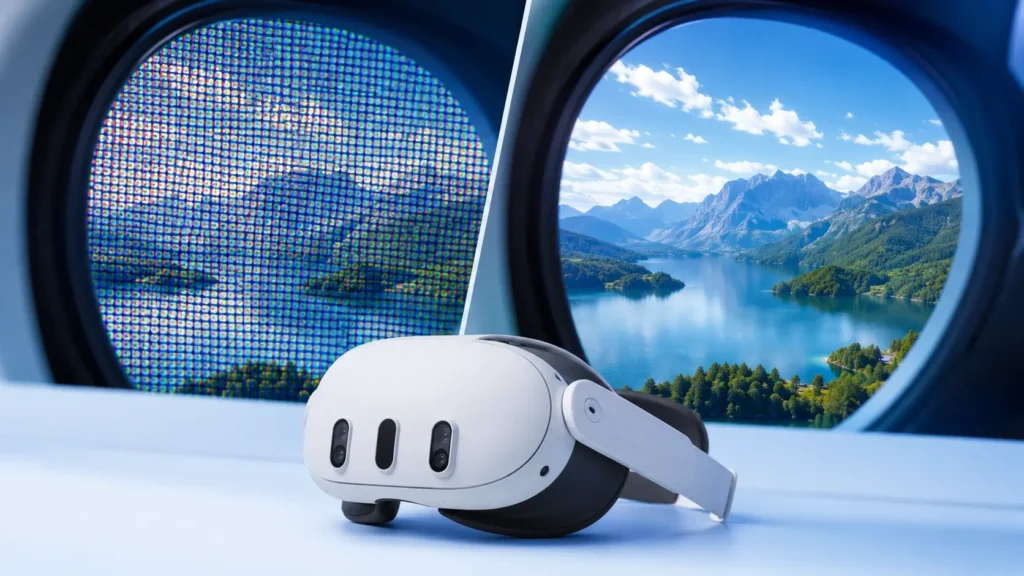
The screen door effect (SDE) is a visual artifact in VR headsets where you can see thin black lines between individual pixels, resembling looking through a mesh screen door. It happens because VR lenses magnify the display extremely close to your eyes, making the unlit gaps between pixels visible as a fine grid pattern. Modern headsets — Apple Vision Pro, Meta Quest 3, Pico 4 Ultra — have effectively eliminated visible SDE through higher pixel density and pancake lenses.
The Short Version
- What it is: A grid pattern visible between pixels in VR, like looking through window screening.
- Why it happens: VR lenses magnify the display at extreme proximity, exposing the gaps between sub-pixels.
- How to measure it: Pixels per degree (PPD) is the gold standard — anything below ~30 PPD may show SDE under inspection.
- Modern headsets: Vision Pro (~34 PPD), Quest 3 (~25 PPD), Pico 4 Ultra (~22 PPD), Varjo XR-4 (~51 PPD). All have minimal-to-zero visible SDE.
- Older headsets: Original Rift, Vive, Quest 1, and PSVR1 all show pronounced SDE.
- How to fix it: You can't really fix it on a given headset. Higher render resolution helps marginally; the real solution is a newer headset.
What is the screen door effect in VR?
The screen door effect — usually shortened to SDE — is a visual artifact where a fine grid of thin black lines becomes visible between individual pixels on a VR headset's display. The pattern looks remarkably like staring at the world through a mesh screen door, which is where the name comes from.
SDE isn't unique to VR. It originally showed up on rear-projection televisions and early LCD displays in the 1990s. Sit close enough to any backlit display and you'll see it. Modern OLED TVs, smartphones, and computer monitors have effectively eliminated visible SDE because their pixel density is so high relative to typical viewing distance that the gaps between pixels disappear.
VR brought it back. When you strap a headset to your face, you're putting a small display 1–3 inches from your eyes and magnifying it through lenses across an 80–120° field of view. Even high-resolution panels look low-resolution at that magnification — and the unlit space between pixels becomes a visible part of the image.
Why does the screen door effect happen?
Three things combine to create SDE in VR:
1. Display panel structure
Every digital display is made of individual pixels, and every pixel is made of sub-pixels — typically red, green, and blue. Between each sub-pixel and each pixel, there are tiny unlit gaps. The ratio of lit to unlit area is called fill factor. A 100% fill factor would mean no gaps; real-world panels hit 70–95% depending on the technology.
Two factors here matter most:
- Sub-pixel arrangement. RGB stripe (red, green, blue in equal vertical bars) produces less visible SDE than PenTile (alternating diamond pattern with fewer green or blue sub-pixels). Quest 1 used PenTile OLED and had pronounced SDE; Quest 2 and 3 use RGB stripe LCD with much less SDE.
- Panel type. Micro-OLED panels (used in the Apple Vision Pro and high-end Varjo headsets) have extremely tight pixel pitch and near-perfect fill factor — the highest visual quality currently available.
2. Lens magnification
VR headsets use lenses to focus the close display at a comfortable virtual distance and to expand the field of view. Every magnification step also magnifies the gaps between pixels.
The lens type matters significantly:
- Fresnel lenses (Quest 1, Vive, Index, Rift S) show more pronounced SDE because of god rays, chromatic aberration, and lower edge-to-edge sharpness.
- Pancake lenses (Quest 3, Vision Pro, Pico 4, Vive Focus Vision) deliver sharper edge-to-edge clarity, less optical distortion, and reduce the visibility of SDE meaningfully.
- Aspheric lenses (some specialty enterprise headsets) sit between the two on cost and performance.
3. Eye-to-display proximity
Your eye can resolve roughly 60 pixels per degree at the center of vision. VR headsets place a panel inches from your face and ask you to look at it through magnifying lenses. To match retinal limits across a 100° field of view, a headset would need a panel resolution of about 6,000×6,000 per eye. We're not there yet — but we're getting close.
How screen door effect is measured: PPD
The right way to compare SDE across headsets isn't raw pixel count — it's pixels per degree (PPD). PPD measures how many pixels fill one degree of your field of view. Higher PPD means denser pixels relative to what you see, which means less visible SDE.
Once a headset clears roughly 25 PPD, most users stop noticing SDE during normal use. Above 35 PPD, even users actively looking for SDE struggle to spot it. Above 50 PPD, it's essentially indistinguishable from real-world clarity for most observers.
Why raw resolution lies
A 4K-per-eye panel sounds amazing — but stretched across a 110° field of view, that's still only ~36 PPD. Compare that to viewing a 4K TV at normal distance, which can hit 80+ PPD because you're not magnifying it across your entire vision. Always look at PPD, not just panel resolution, when comparing headsets for SDE.
Screen door effect by headset
Here's how the major current VR headsets stack up on SDE. The table below shows each headset's display tech, PPD, and how visible SDE actually is to a typical user.
| Headset | Display | PPD | SDE Visibility |
|---|---|---|---|
| Apple Vision Pro | Dual micro-OLED, ~3660×3200/eye | ~34 | None visible |
| Varjo XR-4 | Dual mini-LED LCD, 3840×3744/eye | ~51 | None visible |
| Meta Quest 3 | LCD, 2064×2208/eye, pancake lenses | ~25 | Very minimal |
| Pico 4 Ultra | LCD, 2160×2160/eye, pancake lenses | ~22 | Very minimal |
| HTC Vive Focus Vision | LCD, 2448×2448/eye, pancake lenses | ~26 | Minimal |
| Meta Quest 3S | LCD, 1832×1920/eye, fresnel lenses | ~20 | Mild — visible on solid backgrounds |
| Bigscreen Beyond | Dual micro-OLED, 2560×2560/eye | ~32 | None visible |
| Valve Index (legacy) | LCD, 1440×1600/eye, fresnel | ~14 | Pronounced |
| Original Quest 1 (legacy) | OLED PenTile, 1440×1600/eye | ~13 | Severe |
The takeaway is clear: any pancake-lens headset released after 2023 has effectively solved SDE for typical use. If you're still seeing it on a current-gen headset, you're either looking very deliberately at a solid white or pastel background, or you have a particularly sensitive eye for fixed-pattern noise.
SDE vs. pixelation vs. mura: don't confuse them
People often lump three different VR display issues together. They're not the same:
Screen Door Effect
The grid of black lines between pixels caused by sub-pixel gaps and lens magnification. Fixed by higher pixel density. Software cannot fix it.
Pixelation / Aliasing
Jagged edges or visible square pixels in low-resolution content. Fixed by anti-aliasing, supersampling, or higher render resolution. Has nothing to do with the headset's panel.
Mura
Cloudy, uneven brightness across the display caused by manufacturing variance in OLED panels. More common on early OLED VR headsets. Cannot be fixed with software.
How to reduce screen door effect on your VR headset
The honest answer: you can't fully eliminate SDE on a headset that has it. SDE is a hardware artifact tied to your panel and lenses. But you can reduce its visibility:
1. Adjust your IPD precisely
Interpupillary distance — the distance between your pupils — must match the headset's lens spacing. If it's even slightly off, your eyes view the display at an angle that exaggerates pixel structure. Use the headset's IPD adjustment until text appears sharpest.
2. Increase render resolution (PCVR only)
On PCVR headsets, supersampling renders the image at higher-than-native resolution before downsampling to the panel. This sharpens content and slightly masks SDE on solid-color areas. SteamVR's render resolution slider and Oculus Tray Tool both expose this.
3. Keep lenses spotless
Smudges, fingerprints, and dust on lenses scatter light and exaggerate the appearance of SDE. Use a microfiber cloth designed for optics, never paper or shirts.
4. Avoid solid pastel and white backgrounds
SDE is most visible on solid light-colored backgrounds. Loading screens, sky textures, and snowy environments expose it. Most actual gameplay or training scenarios have enough visual complexity that SDE disappears into the content.
5. Upgrade to a current-gen headset
If SDE bothers you on a Quest 1, Rift S, or original Vive, the only real fix is a 2023+ pancake-lens headset. The improvement isn't subtle.
What doesn't help
Anti-aliasing settings, motion smoothing, brightness adjustments, and most third-party "SDE reduction" software do nothing meaningful. SDE is a function of physical pixel layout. Until you change the hardware, it's there.
The future of SDE: where displays are headed
SDE is on track to become an obsolete concern within a few years. Three technology trends are driving it out:
Micro-OLED at scale
Apple Vision Pro proved micro-OLED can ship in a consumer-grade headset. Sony, Samsung Display, BOE, and Seeya are all racing to bring micro-OLED to mid-range price points. Within a few years, expect $1,500–$2,500 micro-OLED headsets with 30+ PPD as the new mainstream baseline.
Foveated rendering as compute solution
Eye-tracking hardware on Vision Pro, PSVR2, and Quest Pro lets headsets render maximum resolution only where you're looking, and lower resolution in peripheral vision. This unlocks the ability to ship 8K-per-eye panels without crushing the GPU. Higher resolution = higher PPD = no SDE.
Pancake lenses as the new standard
Pancake lens manufacturing has matured rapidly. Every major headset shipping today except entry-level fresnel models uses pancake or aspheric lens systems. Edge-to-edge clarity continues to improve with each generation.
What screen door effect means for enterprise VR training
If you're evaluating VR for workforce training today, SDE shouldn't be on your top-five concern list. Here's why:
- The hardware most enterprises deploy — Quest 3 and 3S — has effectively zero visible SDE during typical training scenarios. Trainees are looking at procedural content with rich textures and dynamic lighting, not staring at solid pastel walls.
- Higher fidelity rarely correlates with better training outcomes. Multiple peer-reviewed studies show that knowledge retention and task performance in VR training are driven by interactivity, scenario design, and spaced repetition — not by display sharpness above a usable threshold.
- Standalone headset economics matter more than visual fidelity. A Quest 3S at $299 with minimal SDE is a vastly better deployment choice than a $3,500 Vision Pro for most enterprise training programs, even though the Vision Pro has zero SDE.
That said, for specific use cases — surgical training, design review, fine visual inspection — display fidelity does matter. In those scenarios, Vision Pro, Varjo XR-4, or Bigscreen Beyond are worth the premium.
If you'd like to discuss whether SDE or display quality matters for your specific training program, book a demo with VR Vision — we'll walk you through the right hardware decision based on your use case, not the spec sheet.
Curious which VR headset is right for your team?
VR Vision builds enterprise XR training across every major headset platform. Tell us your training scenario, and we'll recommend the right hardware — based on what works in deployment, not spec sheets.
Frequently asked questions
What is the screen door effect in VR?
The screen door effect (SDE) is a visual artifact in VR headsets where the user can see thin black lines between individual pixels on the display, resembling looking through a mesh screen door. It happens because VR lenses magnify the display so close to your eyes that the unlit gaps between pixels become visible. Modern headsets like the Apple Vision Pro, Meta Quest 3, and Pico 4 Ultra have largely eliminated visible SDE through higher pixel density and improved lens technology.
Why does the screen door effect happen?
The screen door effect happens because VR lenses magnify display panels held very close to your eyes. At that magnification, the small gaps between individual sub-pixels — which are invisible on a phone or TV viewed at normal distance — become visible as a grid pattern. The effect is influenced by pixel density (PPD), sub-pixel arrangement (RGB stripe vs PenTile), fill factor, and lens type.
Do modern VR headsets still have screen door effect?
Most modern VR headsets have effectively eliminated visible SDE for typical users. The Apple Vision Pro (34 PPD with micro-OLED) and Meta Quest 3 (25 PPD with pancake lenses) show no noticeable screen door effect under normal use. Higher-end specialty headsets like the Varjo XR-4 push past 50 PPD. Older headsets like the original Oculus Rift, Vive, and Quest 1 still exhibit visible SDE.
What is PPD and why does it matter for SDE?
PPD stands for pixels per degree, the most accurate measure of VR display sharpness. It measures how many pixels fill one degree of your field of view. The human eye's retinal limit is around 60 PPD — anything below that can theoretically show SDE under close inspection. The Quest 3 hits 25 PPD, Vision Pro 34 PPD, and Varjo XR-4 reaches 51 PPD. The higher the PPD, the less visible the screen door effect.
How can I reduce the screen door effect on my VR headset?
You cannot fully eliminate SDE on a headset that has it, but you can minimize its visibility by adjusting your IPD (interpupillary distance) for sharpest focus, increasing render resolution or supersampling in PCVR titles, ensuring lenses are clean and smudge-free, and considering a headset with higher pixel density. Anti-aliasing and post-processing have no effect on SDE because SDE is a hardware artifact, not a software one.
What is the difference between SDE and pixelation in VR?
Pixelation refers to seeing individual square pixels in a low-resolution image — a software and content issue. The screen door effect refers to seeing the unlit gaps between pixels as a fine grid pattern — a hardware artifact caused by the panel structure and lens magnification. Pixelation can be improved with anti-aliasing or higher render resolution; SDE can only be improved by switching headsets.
Does the Apple Vision Pro have screen door effect?
The Apple Vision Pro has effectively no visible screen door effect. Its dual micro-OLED displays deliver 23 million pixels combined at approximately 34 pixels per degree, with a fill factor approaching 100%. Most users report SDE is impossible to see under normal viewing conditions.
Does the Meta Quest 3 have screen door effect?
The Meta Quest 3 has minimal screen door effect under typical use. Its dual LCD panels at 2064×2208 per eye deliver 25 PPD, paired with pancake lenses that reduce optical aberrations. Most users do not notice SDE during gameplay or training scenarios, though it can be detected when actively looking for it on light or solid-colored backgrounds.
Will the screen door effect ever be completely gone?
SDE is on track to become a non-issue within a few years as micro-OLED displays scale to mid-range price points and pixel density continues to climb past the human retinal limit of approximately 60 PPD. Specialty headsets like the Varjo XR-4 already approach this threshold. Within a few years, every consumer-grade VR headset is expected to deliver imperceptible SDE.
Building enterprise VR? Hardware matters.
VR Vision has shipped enterprise XR training for energy, utilities, manufacturing, and rail organizations across North America for over a decade. We'll help you pick the right headset for your use case — and build the training that runs on it.