
The bottom line
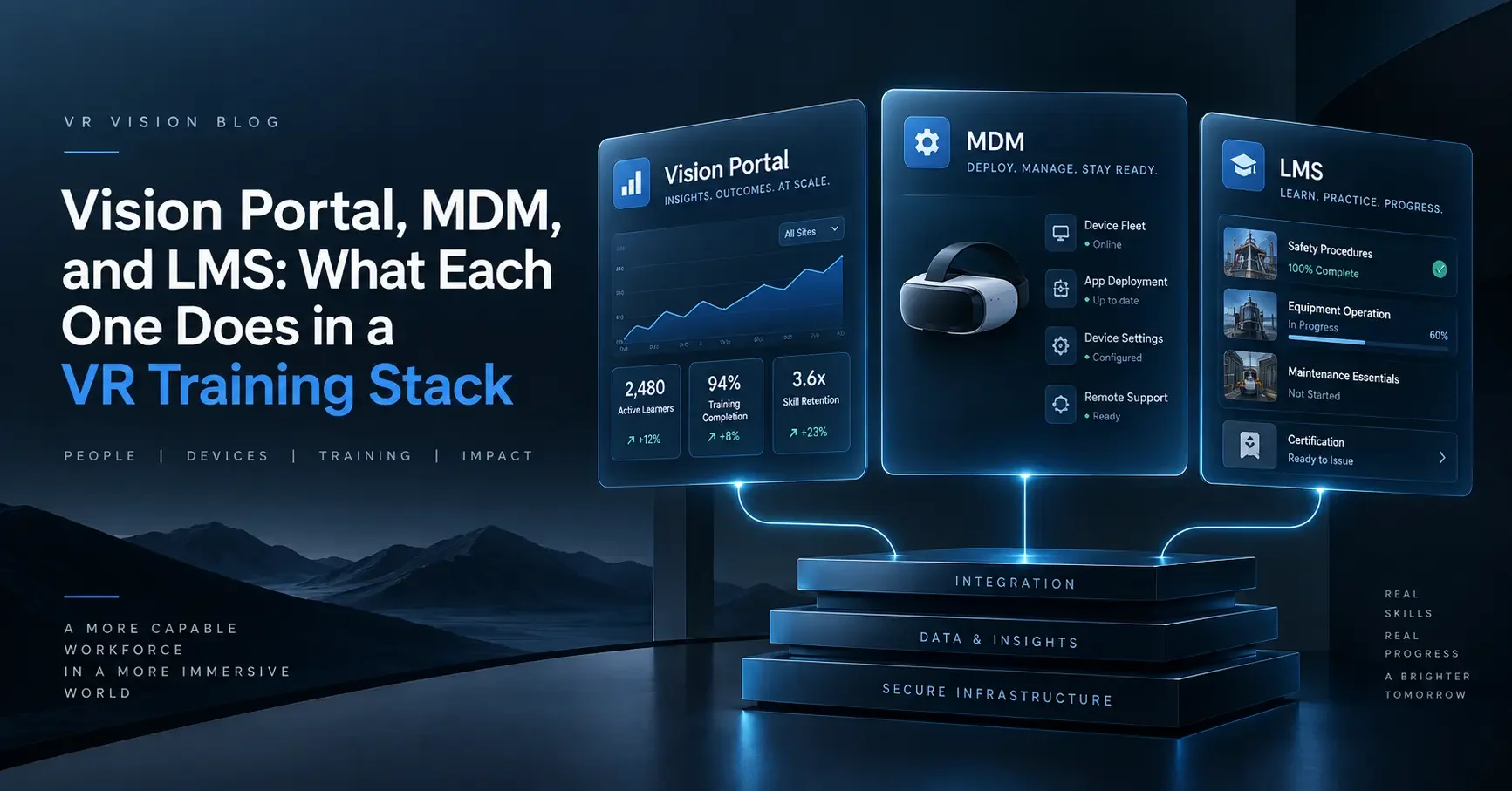
A VR training stack has three systems, and each one works at a different level. The MDM manages the headset (device level). A VR training platform like Vision Portal manages the training running on it (content level). The LMS keeps the official result (record level). They only look like they overlap. Give each system one job and most of the setup decisions get easier.
"We already have an LMS, and IT is buying an MDM. So what's Vision Portal for?"
I hear some version of that in almost every kickoff. It usually comes from someone in IT who has just been handed a cart of headsets and a list of new logins, and it's a reasonable thing to ask. Put the three systems side by side on a slide and they look like they overlap. They all have dashboards. They all list users. Two of them touch the headset.
The way I explain it is that each system works at a different level:
- The MDM works at the device level. It looks after the headset itself.
- Vision Portal works at the content level. It looks after the training running on the headset.
- The LMS works at the record level. It keeps the official result.
Once a team sees the stack in levels, the overlap mostly disappears, and most of the setup decisions get much easier.

Device level vs. content level: where people get confused
The LMS is rarely the source of confusion. Everyone already knows what it does. The line that gets blurred is between the MDM and Vision Portal, because both of them reach into the headset.
The difference is what they can see. The MDM sees the headset as a device: its battery, its Wi-Fi connection, its operating system, and which apps are installed. To the MDM, our training app is a package with a version number. It has no idea what's inside.
Vision Portal works inside that app. It knows which trainee is signed in, which course they've been assigned, which step they're on, how long they've spent there and what they're seeing right now.
A simple test for IT teams
If the question is about the headset, it's a device-level question for the MDM. If it's about the trainee or the training, it's a content-level question for Vision Portal.
Where to look for the answer, by question.
| Question | Level | Where to look |
|---|---|---|
| Is headset 14 charged and online? | Device | MDM |
| Is every headset on the latest build? | Device | MDM |
| Can a trainee get out of the training app? | Device | MDM |
| Which course is Jordan assigned? | Content | Vision Portal |
| Where did trainees get stuck on the isolation procedure? | Content | Vision Portal |
| Can I see what this trainee is seeing right now? | Content | Vision Portal |
| Is Jordan qualified for switching work? | Record | LMS |
Following one VR training session through the levels
The clearest way to see the levels working together is to follow one trainee through one session.
Say it's a Tuesday morning at a utility training centre. An apprentice is about to practise isolating a switchgear panel in VR for the first time.
- The night before · Device levelThe MDM gets every headset ready. Around 2 a.m., the MDM checked in with every headset on the charging cart, installed last week's app update (about 1.5 GB per headset) and confirmed they were all on the same build. It also kept them on the operating system version we'd tested, even though the manufacturer had released a new one a few days earlier. When the apprentice picks up a headset, it boots straight into the training launcher. Kiosk mode means there's no home screen, no app store and no browser. Nobody had to touch the headset to get it ready.
- 8:30 a.m. · Content levelVision Portal runs the session. The apprentice signs in with their normal work account through single sign-on, and Vision Portal already has the course assigned to them. At the front of the room, the trainer has Vision Portal open on a laptop with a live view from every headset. Ten minutes in, the apprentice reaches for the wrong breaker. The trainer sees it, talks them through it over the headset audio, and they carry on. With eight trainees and one instructor in the room, this is what makes the session manageable. Meanwhile, Vision Portal records the detail: how far the apprentice got, how long each part took, where they hesitated and how they answered the post-session survey.
- 9:05 a.m. · Record levelThe LMS gets the summary. When the apprentice finishes, a summary goes to the LMS: completed, score, time spent. Their compliance record updates the same way it would for any other course, and their supervisor sees it next to their other certifications.
- After the session · Device levelBack on the cart. The headset goes back on the cart. The MDM sees it come back online, reports its battery and storage, and lines up anything that needs to install that night.
Three systems were involved in that session, each at its own level. None of them did another one's job.
The device level: what the MDM is for
A standalone headset like the Meta Quest 3S or PICO 4 Enterprise is an Android-based device with cameras, microphones and a Wi-Fi radio. Someone has to enrol it, configure it, keep it updated, and be able to lock or wipe it if it goes missing. That's the job of mobile device management (MDM).
In our deployments, the MDM handles Wi-Fi profiles, kiosk mode, app installs and updates, firmware control, and security settings like turning off USB debugging. It also gives IT a view of the whole fleet: which headsets are online, how much battery and storage each one has, and which build is installed. For the wider security picture, see our XR IT security and deployment best practices.
I'd recommend a VR-specific MDM over a general-purpose Android one. General-purpose tools can enrol a headset, but they tend to struggle with VR launchers, boundary settings and 1 to 2 GB app packages. Vision Portal's device management runs through ArborXR, and we also support ManageXR.
What the MDM doesn't know is anything about training. It can tell you a headset was in use for 45 minutes. It can't tell you whether the trainee isolated the breaker before opening the panel.
The content level: what a VR training platform like Vision Portal is for
Vision Portal is the only one of the three that understands what's happening inside the training, and it's where trainers and L&D teams spend most of their time. It covers:
- Live remote assistance: a first-person view from any headset in a browser, with the ability to talk to the trainee, skip steps and control course progression.
- Course management: assigning courses to individuals or groups, previewing content before it goes out and searching the catalogue.
- Training analytics: completion rates, time spent and learner progress for every course, with timeframe filters and side-by-side course comparison.
- Surveys: post-session questions on confidence, comprehension and readiness, tracked over time.
- Access control: single sign-on with Microsoft Entra ID, Okta, Google and WorkOS, plus MFA and role-based permissions.
The MDM makes sure the headset is ready. Vision Portal makes sure the training on it is working, and shows you what to change in the next session.
The record level: what the LMS is for, and why it only sees the summary
Your LMS is where training requirements live. It assigns mandatory courses, tracks compliance, issues certificates and often feeds HR. Adding VR shouldn't change any of that. The LMS should stay the place you go to answer "who is qualified to do what?"
On request, we connect Vision Portal to your LMS so results flow up using SCORM 1.2, SCORM 2004 or xAPI. That covers Cornerstone, SAP SuccessFactors and almost every other enterprise LMS. What the LMS can do with that data depends on the standard:
- SCORM 1.2 passes a small, fixed set of fields: completion status, score and session time, plus a small block of saved progress data. That's plenty for a compliance record.
- SCORM 2004 separates "completed" from "passed" and can record individual interactions. In practice, most LMS reporting screens don't show those interactions in a useful way.
- xAPI can record individual actions as separate statements, like "the trainee applied the ground before testing for voltage." It's the richest of the three, but many LMS reports still show the overall result.
There's also a practical gap. SCORM was designed for a course that the LMS launches in a browser tab, and a headset isn't a browser tab. We close that gap when we configure the integration, so when a trainee finishes in the headset, their completion, score and time land on their LMS record against the right course, with nobody re-entering results. It doesn't fall to your LMS team.
My advice is to let the LMS do what it does well, which is keeping the record, and not try to turn it into your VR analytics tool. The detail stays at the content level, in Vision Portal.
Three VR training stack setups I'd avoid
Most of the integration problems I see come from two systems being set up to do the same job, usually across levels.
- Two systems installing app builds. Installing and updating the app is a device-level job. If the MDM and another tool are both pushing builds, you'll eventually have half the room on one version and half on another, and a trainer trying to work out why the steps don't match. Pick one system to own installs. In our deployments, that's the MDM.
- Two separate user lists. If a trainee has one account in the LMS and a different one in the headset, someone ends up matching names in a spreadsheet every month. Connect Vision Portal and the LMS to the same identity provider so each person is the same user at every level.
- Expecting content-level detail at the record level. If your L&D team expects to open the LMS and see which step a trainee got wrong, have that conversation early. The LMS will show the outcome, and Vision Portal will show the steps.
Who owns each level
Ownership follows the levels.
| Level | System | Owner | What they do with it |
|---|---|---|---|
| Device | MDM | IT | We set it up during deployment and hand over admin access at go-live. |
| Content | Vision Portal | Trainers and L&D | Trainers run and support sessions. L&D uses the reports to decide what to improve. |
| Record | LMS | L&D and HR | Own the LMS integration and decide what counts as a pass. |
Do you need all three levels on day one?
Not always. A 10-headset pilot in one training room can run on the device and content levels alone, with the LMS connected once you know the training works. That's often quicker, because LMS integration tends to wait on internal approvals more than technical work. Our VR training implementation playbook walks through how to sequence a rollout.
Once you're running multiple sites, hundreds of headsets and real compliance requirements, you'll want all three connected, because each level covers something the other two can't.
Work with VR Vision
Map your VR training stack with our team
If you're working out how VR training will fit with your current systems, I'm happy to go through your LMS, identity provider and network setup with your IT team.
- Device management through ArborXR, set up for your fleet
- Vision Portal with SSO, live remote assist and training analytics
- LMS integration over SCORM or xAPI, set up on request
Trusted by
ToyotaSiemensCoca-ColaToronto Hydro
Frequently asked questions
What is the difference between an MDM and a VR training platform?
An MDM manages the headset as a device: enrolment, Wi-Fi, kiosk mode, app installs, firmware and remote wipe. A VR training platform like Vision Portal manages what happens inside the training: who is signed in, which course they're assigned, where they get stuck, and a live view for the trainer. If the question is about the headset, ask the MDM. If it's about the trainee or the training, ask the training platform.
Do I need an MDM for VR training headsets?
Yes, for any fleet beyond a handful of headsets. Standalone headsets like the Meta Quest 3S and PICO 4 Enterprise are Android-based devices that need to be enrolled, locked into kiosk mode, kept on a tested build and wiped if lost. A VR-specific MDM such as ArborXR or ManageXR handles VR launchers and large app packages better than a general-purpose Android MDM.
Can VR training results show up in our LMS?
Yes. On request, VR Vision connects Vision Portal to your LMS using SCORM 1.2, SCORM 2004 or xAPI, including Cornerstone and SAP SuccessFactors. The LMS receives the summary (completion, score and time spent), while step-by-step detail stays in Vision Portal.
Why doesn't the LMS show which step a trainee got wrong?
Most LMS reports are built around course outcomes. SCORM 1.2 only carries completion, score and time. SCORM 2004 and xAPI can carry more detail, but many LMS reporting screens still show only the overall result. Step-level detail lives in Vision Portal's training analytics.
Do we need all three systems for a VR training pilot?
Not always. A small pilot, such as 10 headsets in one training room, can run on an MDM and Vision Portal alone, with the LMS connected once the training is proven. Multi-site rollouts with compliance requirements need all three.